Guided Educational Picture Book Illustration AI photo style example on PhotoReady
PhotoReady | photoready.kaamkardo.com
Custom Creator Style

Guided Educational Picture Book Illustration

Created by
@gpt-image-2-library
Prompt source:@MrLarusviaawesome-gpt-image-2

Rights holder? Request removal via our contact page.

#Charts & Infographics#Infographic#Illustration#Character#Education#Travel#Story
Freeper generation
Secure transactions and inputs
Outputs completed in under 15 seconds
Powered by Photo Ready Engine
Use this prompt in

Every click copies the prompt. ChatGPT and Grok open with it already typed; the rest need one paste.

Prompt Template
Free Access
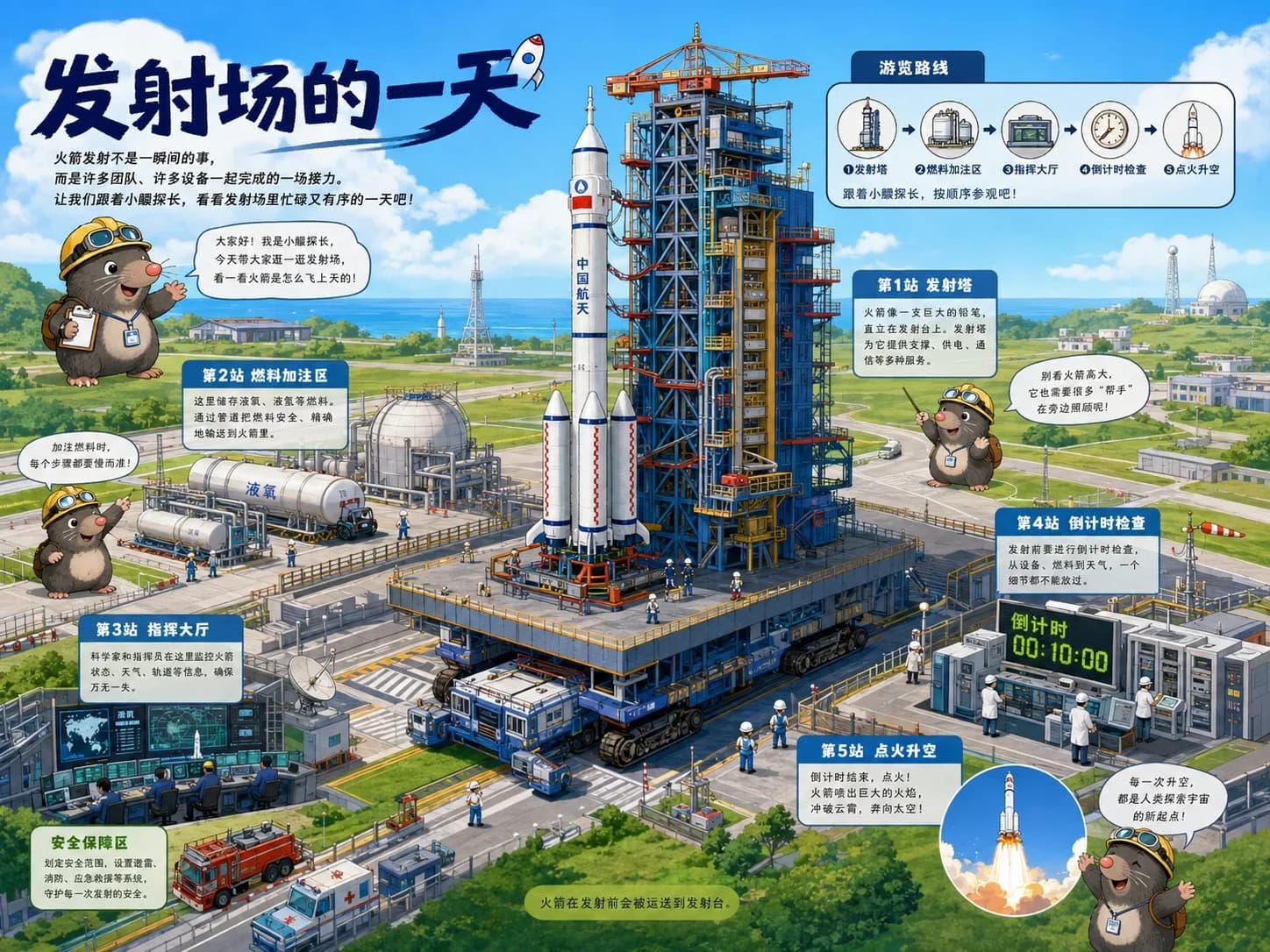
Guided Educational Picture Book Prompt: Please create a high-quality illustration in the style of a 'guided educational picture book' based on the [THEME]. This is a scene-based guided educational illustration page that combines 'large scene main visual + guided route + cute guide IP + knowledge stations + children's picture book texture.' The image should make viewers feel as if they are being taken on a tour of a complex system, understanding the operational logic, spatial structure, process relationships, and key knowledge points behind the theme as they look. [Basic Settings] Theme: [Fill in the theme, e.g., A Day at the Launch Site / A Container's Journey / Secrets of the Subway Station / An Hour in the Deep Sea / How the Airport Operates / Emergency Room System in a Hospital / Smart Farm / Fire Station Response Process] Aspect Ratio: [4:3 Landscape] Main Color Tone: [Automatically match based on the theme, keeping it bright, fresh, and child-friendly] Style Direction: [Modern Children's Educational Picture Book / Scene-Based Guided Illustration / High-Quality Digital Illustration] [Core Expression] Please design a complete large scene or complex system around the [THEME]. The image must have a clear main visual scene, such as a large facility, transportation system, technological equipment, natural exploration scene, urban public system, or production process. The subject should be clear, substantial, and detailed enough to serve as the visual center at first glance. The image should organize information through a 'guided route' approach, avoiding a static display of the scene. Please design a clear visiting route, process route, timeline, or spatial movement line, allowing readers to understand how this system operates step by step along the route. [Guide IP Design] Please design an original, cute, and friendly guide IP for this illustration. The guide IP can be a small animal, a child, anthropomorphized tools, or other original characters suitable for the theme, but must be independently original and not replicate any characters, animal images, clothing, color schemes, or partnerships from reference images. The role of the guide IP is to: 1. Introduce the theme at the beginning 2. Point to key knowledge points 3. Guide readers along the route 4. Enhance the sense of companionship and fun in the children's picture book The guide IP can appear 2-3 times in the image but should not overshadow the main visual. The character should be rounded, cute, expressive, and active, suitable for a children's educational picture book. [Information Structure] Please set up 3-6 'knowledge stations' in the image, each expressed with a short label and brief explanation. Station naming can adopt: - Station 1 | xxx - Station 2 | xxx - Key Observation | xxx - Fun Fact | xxx - Why | xxx - How It Works | xxx Each knowledge point should revolve around the core operational logic of the theme, avoiding vague explanations. The text should be short, clear, and natural, avoiding long paragraphs, suitable for children's reading. [Image Modules] The entire illustration is suggested to include the following modules: 1. Top Main Title Area: Clearly state the theme name 2. Opening Guided Area: Guide IP introduces the theme 3. Large Main Scene Area: Display the complete scene of the theme system 4. Guided Route Area: Connect knowledge points with arrows, dashed lines, paths, timelines, or process lines 5. Knowledge Station Area: Display key knowledge with small information boxes, guide signs, or partial annotations 6. Fun Facts / Tips Area: Supplement with an interesting piece of knowledge 7. Closing Area: Let the guide IP make a brief summary or lead [Composition Requirements] The image should adopt a 4:3 landscape composition, resembling a high-quality children's educational picture book spread, as well as a children's science museum guide map. The image needs a clear visual focus: the large main scene occupies the main space, the guided route runs through the image, and the knowledge modules are naturally distributed around. The information should be rich but not cluttered, and the reading path should be smooth. [Visual Style] Overall, adopt a modern children's educational picture book style: - Bright, fresh, clean colors - Clear, natural hand-drawn lines - High-quality digital illustration texture - Rich but orderly details - Cute but not childish - Educational illustration feel - Guided map feel - Scenes that are realistic and credible, but expressed in a friendly manner [Text and Annotations] Text should primarily be in English, using short titles, short labels, and brief explanations. Avoid generating long, complex text. Information boxes should resemble guide signs, knowledge cards, or tips in children's educational books. Text should be as clear, concise, and readable as possible. [Final Goal] Make the entire image a high-quality page of a children's educational picture book: children are first attracted by the cute characters and large scenes, then can follow the route to understand how the system operates, and finally continue to discover details and knowledge points. The image should have series potential, making it easy to replace different themes for continued creation of similar images.

Prompt explanation

The prompt anchors the model around charts & infographics, then narrows the output with outfit, background, lighting, pose, expression, and camera instructions. The most important variables to preserve are face identity, realistic skin texture, clear eyes, natural proportions, and the professional portrait lens with realistic depth of field look.

Editable variables

OutfitBackgroundLightingPoseExpressionCamera

Expected output

A realistic charts & infographics image with soft, realistic portrait lighting, a simple background that keeps attention on the face, a confident, approachable expression, and clear facial identity.

Common mistakes

  • Using a blurry or heavily cropped source photo.
  • Mixing formal and casual style instructions in the same prompt.
  • Adding too many props or background details.

Tips

  • Keep the clean, polished clothing that matches the intended use direction consistent with the final use case.
  • Preserve the soft, realistic portrait lighting and professional portrait lens with realistic depth of field terms when editing.
  • Use one clear face reference for the most reliable identity match.

Visual evidence for this style

Generated example for Guided Educational Picture Book Illustration

Generated example

Create a vibrant guided educational illustration based on a theme, showcasing a complex system with engaging visuals and informative elements for children.

Background detail for Guided Educational Picture Book Illustration

Background detail

a simple background that keeps attention on the face

LinkedIn preview crop for Guided Educational Picture Book Illustration

LinkedIn preview crop

a natural pose with clear face visibility with a confident, approachable expression.

About this style

Guided Educational Picture Book Illustration is a charts & infographics style built for charts & infographics images, profile photos, and creator visuals. It combines clean, polished clothing that matches the intended use, a simple background that keeps attention on the face, soft, realistic portrait lighting, a natural pose with clear face visibility, and a confident, approachable expression so the generated image feels intentional rather than random. The goal is not only to copy a prompt, but to understand the visual system behind the output.

This style is especially useful for professionals because it keeps the result focused on credibility, facial clarity, and repeatable framing. The professional portrait lens with realistic depth of field direction helps the image look closer to a real portrait session, while the background and lighting choices reduce distractions that can weaken a profile photo, resume image, creator bio, or portfolio thumbnail.

For best results, start with a sharp source image where the face is unobstructed and the head is not heavily cropped. Keep the outfit and background aligned with the final use case: more formal for LinkedIn, resumes, company pages, and founder bios; softer and more expressive for creator profiles, social media, and personal branding.

Structured style metadata

Category
Charts & Infographics
Use case
charts & infographics images, profile photos, and creator visuals

Best use cases for Guided Educational Picture Book Illustration

Create a vibrant guided educational illustration based on a theme, showcasing a complex system with engaging visuals and informative elements for children.

Who should use it

This style fits professionals who need a polished image for charts & infographics images, profile photos, and creator visuals. It is useful when the photo needs to look credible, current, and easy to reuse across professional profiles.

Why this works

The combination of soft, realistic portrait lighting, a simple background that keeps attention on the face, and a confident, approachable expression makes the final image readable at small profile-photo sizes while still feeling realistic at full size.

Outfit guide

Use clean, polished clothing that matches the intended use. Avoid clothing that fights the style direction, especially busy patterns, oversized logos, or colors that clash with the background.

Background guide

The best background is a simple background that keeps attention on the face. It should support the subject without making the final image look staged, crowded, or overly decorative.

Camera and expression guide

Keep professional portrait lens with realistic depth of field, a natural pose with clear face visibility, and a confident, approachable expression. These details help the output read like a real portrait rather than a generic AI image.

Common questions about the Guided Educational Picture Book Illustration style

Is the Guided Educational Picture Book Illustration style free?

Yes. You can copy this style prompt directly from this page and use it in your own image tool.

What source photo works best with this style?

Use a clear portrait with good lighting, an unobstructed face, and minimal blur for the most realistic result.

Can I adapt the prompt?

Yes. Keep the core camera, lighting, and mood terms, then swap details such as outfit, background, or occasion. For this style the terms worth preserving are professional portrait lens with realistic depth of field and soft, realistic portrait lighting.

Which professions suit the Guided Educational Picture Book Illustration style?

It works best for professionals, and can be adapted for adjacent roles by changing outfit, background, and expression details.

What should I avoid?

Avoid low-resolution uploads, covered faces, extreme filters, crowded backgrounds, and instructions that conflict with the style metadata.

Can this style be used for a LinkedIn profile photo?

Yes, especially when the outfit, background, expression, and crop match the professional audience you want to reach. LinkedIn crops profile photos to a circle, so keep the face centred.

Related guides

More styles like this
Photo Ready Logo
Photo Ready