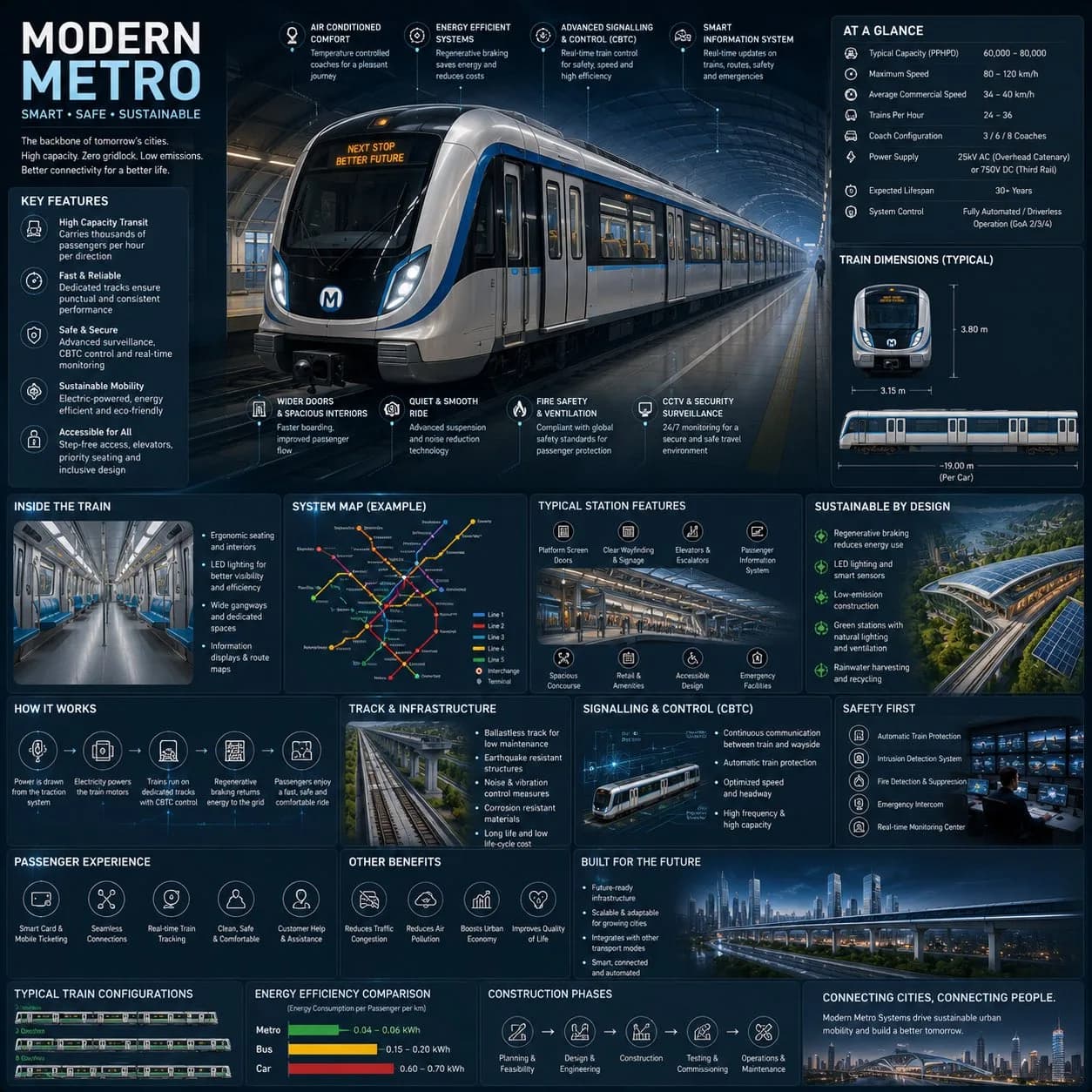
Futuristic Metro System Infographic AI photo style example on PhotoReady
PhotoReady | photoready.kaamkardo.com
Custom Creator Style

Futuristic Metro System Infographic

Created by
@gpt-image-2-library

Rights holder? Request removal via our contact page.

#Charts & Infographics#UI#Infographic#Poster#Tech#Commerce#Education
Freeper generation
Secure transactions and inputs
Outputs completed in under 15 seconds
Powered by Photo Ready Engine
Use this prompt in

Every click copies the prompt. ChatGPT and Grok open with it already typed; the rest need one paste.

Prompt Template
Free Access
Create a premium square “reference-style urban transportation infographic” centered around a futuristic modern metro system called the {METRO_NAME}, designed as a beautifully curated transit-engineering handbook page rather than a public transport advertisement. The composition should feel like a modern visual encyclopedia mixed with an elite railway infrastructure field guide and high-end editorial infographic system. Visual Direction: • 1:1 square composition • Dark premium urban-tech background with subtle railway schematics, metro maps, and futuristic blueprint overlays • Elegant palette using deep navy, matte black, steel gray, electric blue accents, and soft white lighting • Refined editorial typography hierarchy with modern transportation aesthetics • Rounded modular information cards with clean spacing • Gentle realistic reflections and premium HUD-style dividers • Minimal transit-system iconography • Extremely detailed central metro train render viewed in dramatic three-quarter perspective inside a futuristic underground station • Thin precision annotation lines pointing toward transportation systems and smart engineering features • Clean, organized “knowledge-first” layout with high information density but breathable spacing Main Subject Presentation: A stunning ultra-detailed realistic render of the {METRO_NAME} modern metro train placed at the center, featuring sleek aerodynamic train design, glowing destination displays, realistic stainless-steel textures, illuminated station lighting, smart glass windows, premium urban-environment realism, and futuristic rail infrastructure. Surround the metro with scientific and engineering callouts explaining: • regenerative braking system • smart signalling & CBTC control • electric propulsion system • passenger information systems • safety and surveillance technology • platform screen doors • energy-efficient design • smart ventilation systems • accessibility features • track and infrastructure engineering Include modular infographic sections such as: • Metro System Overview • Technical Specifications • Train Dimensions & Layout • Passenger Capacity & Flow • Smart Control Systems • Sustainability Features • Track & Infrastructure Engineering • Signalling & Automation • Station Design & Facilities • Safety & Emergency Systems • Passenger Experience Features • Urban Connectivity & Network Map • Energy Efficiency Comparison • Construction & Expansion Timeline • “Top 5 Smart Innovations” section • Built for Future Smart Cities Add small premium visualization modules like: • metro network maps • train blueprint diagrams • station layout graphics • passenger flow visualizations • signalling workflow diagrams • energy-efficiency comparison charts • train configuration illustrations • smart-city connectivity graphics • platform safety diagrams • infrastructure cross-section visuals Style Keywords: “premium urban mobility encyclopedia” “editorial metro engineering handbook” “high-end transportation infographic” “scientific railway infrastructure poster” “museum-quality transit reference page” “modular smart-city knowledge system” “clean transportation editorial design” “ultra-detailed metro visualization” Avoid: • cluttered public advertisement aesthetics • cartoon transportation styling • unrealistic sci-fi levitating trains • excessive cyberpunk neon overload • chaotic city scenes • generic subway poster layouts The final result should resemble a professionally published railway infrastructure reference-book page created for transit enthusiasts, architects, engineers, urban planners, transportation designers, and educational infrastructure archives.

Prompt explanation

The prompt anchors the model around charts & infographics, then narrows the output with outfit, background, lighting, pose, expression, and camera instructions. The most important variables to preserve are face identity, realistic skin texture, clear eyes, natural proportions, and the professional portrait lens with realistic depth of field look.

Editable variables

OutfitBackgroundLightingPoseExpressionCamera

Expected output

A realistic charts & infographics image with soft, realistic portrait lighting, a simple background that keeps attention on the face, a confident, approachable expression, and clear facial identity.

Common mistakes

  • Using a blurry or heavily cropped source photo.
  • Mixing formal and casual style instructions in the same prompt.
  • Adding too many props or background details.

Tips

  • Keep the clean, polished clothing that matches the intended use direction consistent with the final use case.
  • Preserve the soft, realistic portrait lighting and professional portrait lens with realistic depth of field terms when editing.
  • Use one clear face reference for the most reliable identity match.

Visual evidence for this style

Generated example for Futuristic Metro System Infographic

Generated example

Explore a premium infographic showcasing the {METRO_NAME}, blending modern design with detailed engineering insights for urban transportation enthusiasts.

Background detail for Futuristic Metro System Infographic

Background detail

a simple background that keeps attention on the face

LinkedIn preview crop for Futuristic Metro System Infographic

LinkedIn preview crop

a natural pose with clear face visibility with a confident, approachable expression.

About this style

Futuristic Metro System Infographic is a charts & infographics style built for charts & infographics images, profile photos, and creator visuals. It combines clean, polished clothing that matches the intended use, a simple background that keeps attention on the face, soft, realistic portrait lighting, a natural pose with clear face visibility, and a confident, approachable expression so the generated image feels intentional rather than random. The goal is not only to copy a prompt, but to understand the visual system behind the output.

This style is especially useful for professionals because it keeps the result focused on credibility, facial clarity, and repeatable framing. The professional portrait lens with realistic depth of field direction helps the image look closer to a real portrait session, while the background and lighting choices reduce distractions that can weaken a profile photo, resume image, creator bio, or portfolio thumbnail.

For best results, start with a sharp source image where the face is unobstructed and the head is not heavily cropped. Keep the outfit and background aligned with the final use case: more formal for LinkedIn, resumes, company pages, and founder bios; softer and more expressive for creator profiles, social media, and personal branding.

Structured style metadata

Category
Charts & Infographics
Use case
charts & infographics images, profile photos, and creator visuals

Best use cases for Futuristic Metro System Infographic

Explore a premium infographic showcasing the {METRO_NAME}, blending modern design with detailed engineering insights for urban transportation enthusiasts.

Who should use it

This style fits professionals who need a polished image for charts & infographics images, profile photos, and creator visuals. It is useful when the photo needs to look credible, current, and easy to reuse across professional profiles.

Why this works

The combination of soft, realistic portrait lighting, a simple background that keeps attention on the face, and a confident, approachable expression makes the final image readable at small profile-photo sizes while still feeling realistic at full size.

Outfit guide

Use clean, polished clothing that matches the intended use. Avoid clothing that fights the style direction, especially busy patterns, oversized logos, or colors that clash with the background.

Background guide

The best background is a simple background that keeps attention on the face. It should support the subject without making the final image look staged, crowded, or overly decorative.

Camera and expression guide

Keep professional portrait lens with realistic depth of field, a natural pose with clear face visibility, and a confident, approachable expression. These details help the output read like a real portrait rather than a generic AI image.

Common questions about the Futuristic Metro System Infographic style

Is the Futuristic Metro System Infographic style free?

Yes. You can copy this style prompt directly from this page and use it in your own image tool.

What source photo works best with this style?

Use a clear portrait with good lighting, an unobstructed face, and minimal blur for the most realistic result.

Can I adapt the prompt?

Yes. Keep the core camera, lighting, and mood terms, then swap details such as outfit, background, or occasion. For this style the terms worth preserving are professional portrait lens with realistic depth of field and soft, realistic portrait lighting.

Which professions suit the Futuristic Metro System Infographic style?

It works best for professionals, and can be adapted for adjacent roles by changing outfit, background, and expression details.

What should I avoid?

Avoid low-resolution uploads, covered faces, extreme filters, crowded backgrounds, and instructions that conflict with the style metadata.

Can this style be used for a LinkedIn profile photo?

Yes, especially when the outfit, background, expression, and crop match the professional audience you want to reach. LinkedIn crops profile photos to a circle, so keep the face centred.

Related guides

More styles like this
Photo Ready Logo
Photo Ready