Crumple Chair Concept Sofa Development Board AI photo style example on PhotoReady
PhotoReady | photoready.kaamkardo.com
Custom Creator Style

Crumple Chair Concept Sofa Development Board

Created by
@gpt-image-2-library

Rights holder? Request removal via our contact page.

#Products & E-commerce#UI#Poster#3D#Tech#Commerce#Education
Freeper generation
Secure transactions and inputs
Outputs completed in under 15 seconds
Powered by Photo Ready Engine
Use this prompt in

Every click copies the prompt. ChatGPT and Grok open with it already typed; the rest need one paste.

Prompt Template
Free Access
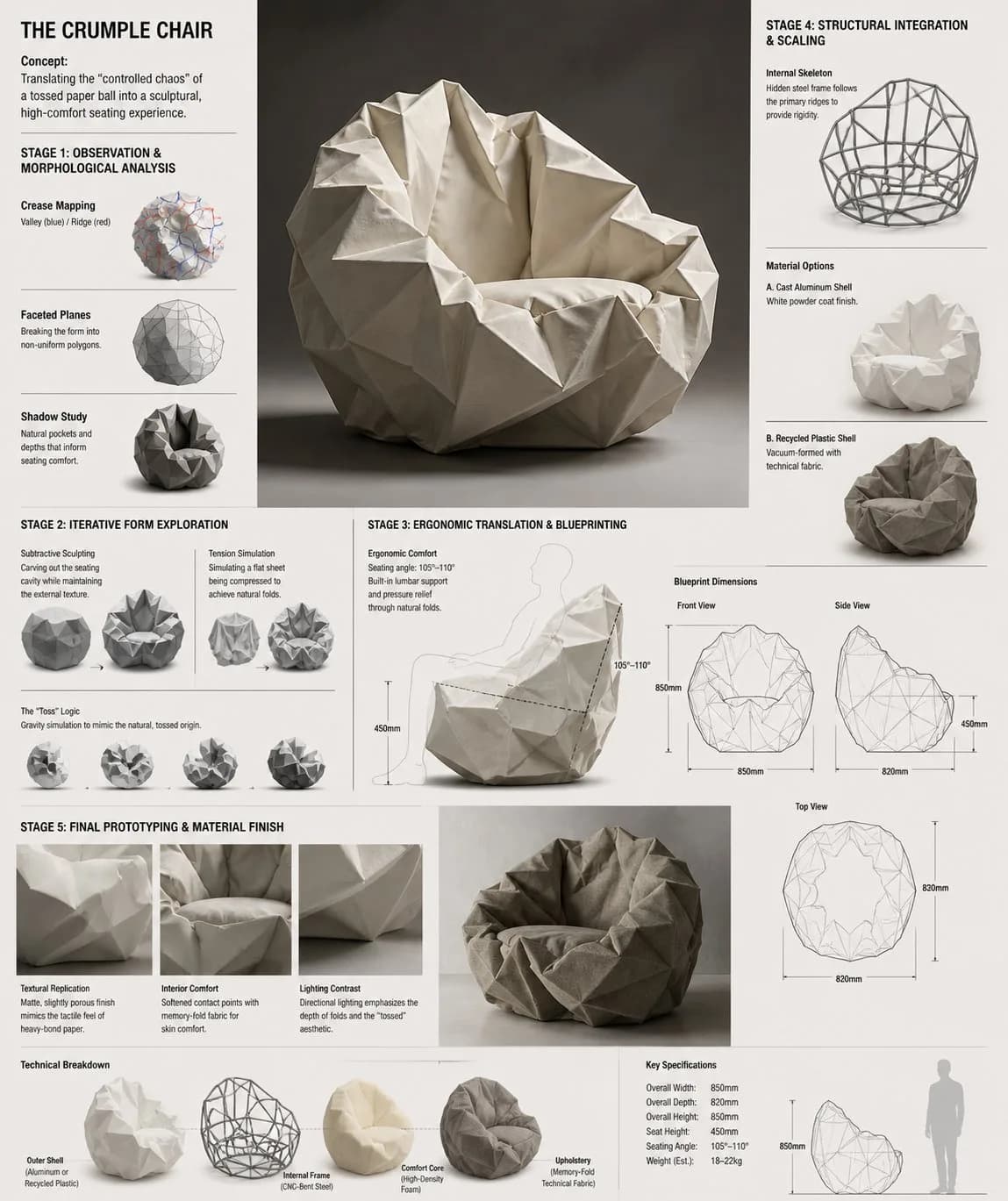
Design Concept: The Crumple Chair Core Philosophy: Translating the "controlled chaos" of a tossed paper ball into a sculptural, high-comfort seating experience. Stage 1: Observation & Morphological Analysis The goal is to deconstruct the image of the crumpled paper into usable geometric data. Crease Mapping: Identify the primary "valley" and "ridge" lines. These represent potential structural ribs or seams in the chair. Faceted Planes: Break down the sphere into a series of non-uniform polygons. Each flat surface of the paper becomes a potential panel for the chair’s upholstery or shell. Shadow Study: Analyze how the "tossed" form creates deep recesses. These natural pockets guide where the user’s weight will be cradled. Stage 2: Iterative Form Exploration Moving from a sphere to a seat through "Digital Crumpling." Subtractive Sculpting: Imagine the paper ball as a solid mass. Use Boolean operations to "carve out" a seating cavity that fits the human form while maintaining the external jagged texture. Tension Simulation: Use 3D software (like Rhino or Blender) to simulate a flat sheet of material being compressed. This ensures the folds look authentic and not "modeled." The "Toss" Logic: Experiment with gravity-based simulation dropping a digital mesh to see how it settles naturally, mimicking the "tossed" origin. Stage 3: Ergonomic Translation & Blueprinting Refining the raw aesthetic into a functional object. The Comfort Core: Overlay a standard ergonomic template (Seating Angle: 105°–110°) over the crumpled form. Adjust the internal "folds" to provide lumbar support and pressure relief. Blueprint Generation: Create technical orthographic views (Front, Side, Top). Map out the dimensions: Seat Height: 450mm Total Width: 850mm Surface Smoothing: Maintain the sharp "paper edges" on the exterior shell while softening the interior contact points for skin comfort. Stage 4: Structural Integration & Scaling Making the concept physically viable. The Skeleton: Design a hidden internal frame (likely CNC-bent steel rods or a 3D-printed lattice) that follows the most prominent ridges of the paper folds to provide rigidity. Material Selection: * Option A (High-End): Faceted, cast aluminum with a white powder coat. Option B (Soft): Vacuum-formed recycled plastic shell covered in "memory-fold" technical fabric that retains a wrinkled appearance. Stage 5: Final Prototyping & Material Finish Textural Replication: Apply a matte, slightly porous finish to the material to mimic the tactile feel of heavy-bond paper. Lighting Contrast: Use directional studio lighting in the final renders to emphasize the "tossed" shadows, making the chair look like a giant piece of discarded inspiration. Design Tip: To keep the "tossed" look authentic, avoid symmetry. The most compelling aspect of a crumpled paper ball is its unique irregularity—ensure the left and right sides of the chair are balance-equivalent but not identical

Prompt explanation

The prompt anchors the model around products & e commerce, then narrows the output with outfit, background, lighting, pose, expression, and camera instructions. The most important variables to preserve are face identity, realistic skin texture, clear eyes, natural proportions, and the professional portrait lens with realistic depth of field look.

Editable variables

OutfitBackgroundLightingPoseExpressionCamera

Expected output

A realistic products & e commerce image with soft, realistic portrait lighting, a simple background that keeps attention on the face, a confident, approachable expression, and clear facial identity.

Common mistakes

  • Using a blurry or heavily cropped source photo.
  • Mixing formal and casual style instructions in the same prompt.
  • Adding too many props or background details.

Tips

  • Keep the clean, polished clothing that matches the intended use direction consistent with the final use case.
  • Preserve the soft, realistic portrait lighting and professional portrait lens with realistic depth of field terms when editing.
  • Use one clear face reference for the most reliable identity match.

Visual evidence for this style

Generated example for Crumple Chair Concept Sofa Development Board

Generated example

An industrial design mood board detailing the five development stages of the Crumple Chair, converting crumpled paper geometry into ergonomic seating.

Background detail for Crumple Chair Concept Sofa Development Board

Background detail

a simple background that keeps attention on the face

LinkedIn preview crop for Crumple Chair Concept Sofa Development Board

LinkedIn preview crop

a natural pose with clear face visibility with a confident, approachable expression.

About this style

Crumple Chair Concept Sofa Development Board is a products & e commerce style built for products & e commerce images, profile photos, and creator visuals. It combines clean, polished clothing that matches the intended use, a simple background that keeps attention on the face, soft, realistic portrait lighting, a natural pose with clear face visibility, and a confident, approachable expression so the generated image feels intentional rather than random. The goal is not only to copy a prompt, but to understand the visual system behind the output.

This style is especially useful for professionals because it keeps the result focused on credibility, facial clarity, and repeatable framing. The professional portrait lens with realistic depth of field direction helps the image look closer to a real portrait session, while the background and lighting choices reduce distractions that can weaken a profile photo, resume image, creator bio, or portfolio thumbnail.

For best results, start with a sharp source image where the face is unobstructed and the head is not heavily cropped. Keep the outfit and background aligned with the final use case: more formal for LinkedIn, resumes, company pages, and founder bios; softer and more expressive for creator profiles, social media, and personal branding.

Structured style metadata

Category
Products & E Commerce
Use case
products & e commerce images, profile photos, and creator visuals

Best use cases for Crumple Chair Concept Sofa Development Board

An industrial design mood board detailing the five development stages of the Crumple Chair, converting crumpled paper geometry into ergonomic seating.

Who should use it

This style fits professionals who need a polished image for products & e commerce images, profile photos, and creator visuals. It is useful when the photo needs to look credible, current, and easy to reuse across professional profiles.

Why this works

The combination of soft, realistic portrait lighting, a simple background that keeps attention on the face, and a confident, approachable expression makes the final image readable at small profile-photo sizes while still feeling realistic at full size.

Outfit guide

Use clean, polished clothing that matches the intended use. Avoid clothing that fights the style direction, especially busy patterns, oversized logos, or colors that clash with the background.

Background guide

The best background is a simple background that keeps attention on the face. It should support the subject without making the final image look staged, crowded, or overly decorative.

Camera and expression guide

Keep professional portrait lens with realistic depth of field, a natural pose with clear face visibility, and a confident, approachable expression. These details help the output read like a real portrait rather than a generic AI image.

Common questions about the Crumple Chair Concept Sofa Development Board style

Is the Crumple Chair Concept Sofa Development Board style free?

Yes. You can copy this style prompt directly from this page and use it in your own image tool.

What source photo works best with this style?

Use a clear portrait with good lighting, an unobstructed face, and minimal blur for the most realistic result.

Can I adapt the prompt?

Yes. Keep the core camera, lighting, and mood terms, then swap details such as outfit, background, or occasion. For this style the terms worth preserving are professional portrait lens with realistic depth of field and soft, realistic portrait lighting.

Which professions suit the Crumple Chair Concept Sofa Development Board style?

It works best for professionals, and can be adapted for adjacent roles by changing outfit, background, and expression details.

What should I avoid?

Avoid low-resolution uploads, covered faces, extreme filters, crowded backgrounds, and instructions that conflict with the style metadata.

Can this style be used for a LinkedIn profile photo?

Yes, especially when the outfit, background, expression, and crop match the professional audience you want to reach. LinkedIn crops profile photos to a circle, so keep the face centred.

Related guides

More styles like this

Photo Ready Logo
Photo Ready