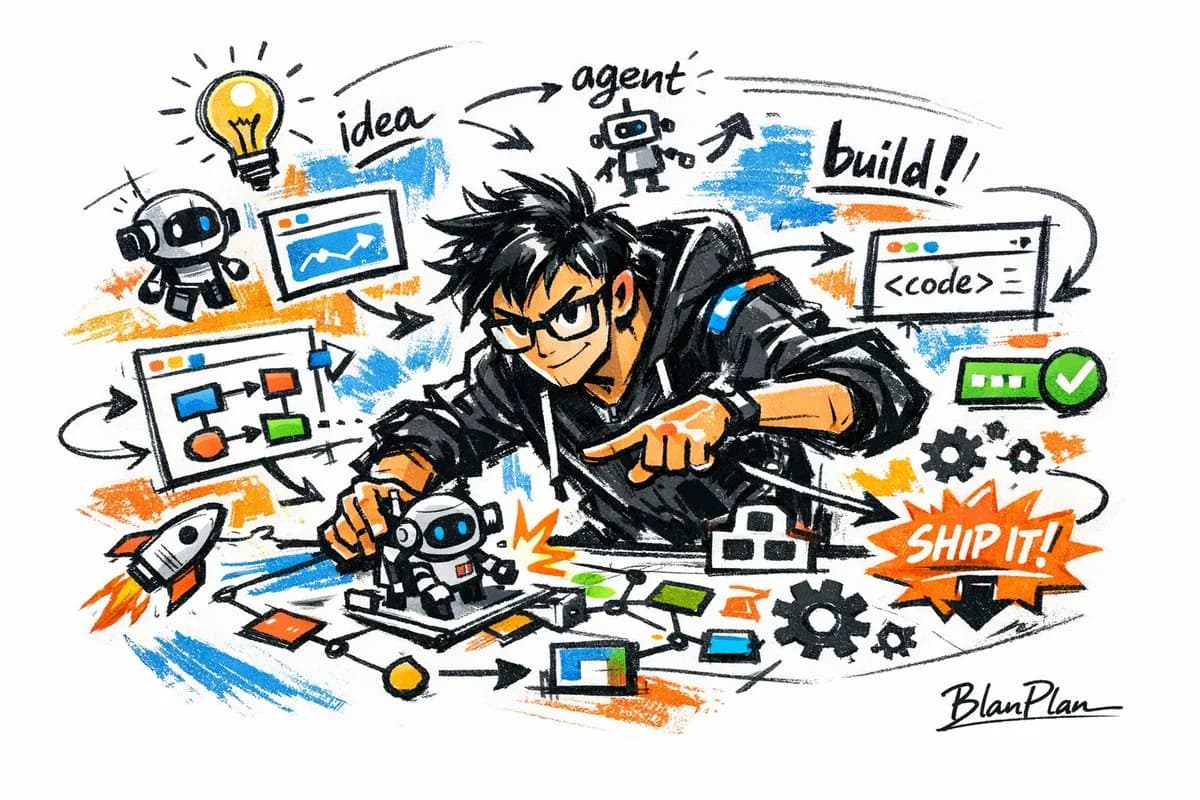
AI Builder Editorial Cover Layout Sketch AI photo style example on PhotoReady
PhotoReady | photoready.kaamkardo.com
Custom Creator Style

AI Builder Editorial Cover Layout Sketch

Created by
@gpt-image-2-library
Prompt source:OpenNanaviaawesome-gpt-image-2

Rights holder? Request removal via our contact page.

#UI & Interfaces#UI#Poster#Realistic#Tech#Commerce#Social
Freeper generation
Secure transactions and inputs
Outputs completed in under 15 seconds
Powered by Photo Ready Engine
Use this prompt in

Every click copies the prompt. ChatGPT and Grok open with it already typed; the rest need one paste.

Prompt Template
Free Access
[Chinese] Express {an awesome AI builder} in a graffiti sketch style, overall presenting a visual effect of quick sketching, free deformation, impromptu hand-drawing and draft-like. The lines are casual, exaggerated, and can vary in thickness, slightly messy but with rhythm and expressiveness, emphasizing summarization, exaggeration, fun and casualness, rather than rigorous realism or fine depiction. The colors use rough blocks with obvious dry brush feel, retaining uneven smearing traces, brush strokes, flying white and covering feel, the colors automatically adapt according to {theme/subject}, but overall maintain a graffiti-style, sketch-style, and summarized expression. Do not use transparent watercolor smudging effects, do not use delicate watercolor transitions, do not use paper texture, do not use soft atomization, do not use dreamy texture. The background is mainly blank, keeping it simple, relaxed, unfinished and designed, can add a small amount of auxiliary symbols, arrows, marks, circled drawings, repeated lines, casually written text or other graffiti elements, to enhance the sketchbook or essay-style visual language, but it must not be too crowded, and must not destroy the subject and blank temperament. The picture content does not need to be written clearly in advance; {an awesome AI builder} automatically deduces and generates the most suitable subject image, movements, related elements, symbols or simplified scenes, overall maintaining a unified graffiti sketch style and exaggerated summarized expression method, avoiding complex realistic backgrounds and excessive padding. The exclusive signature "BlanPlan" needs to be naturally added into the picture as a part of the picture, the position is low-key but clear, can be placed in the bottom left corner, bottom right corner or near the title, the style needs to be unified with the overall layout, like an artwork signature or design sign-off; the signature font is exquisite, restrained, and high-end, must not be too large, must not destroy the subject composition, must not appear abrupt or cheap. [English] Express [an awesome AI builder] in a graffiti sketch style, overall presenting a visual effect of quick sketching, free deformation, impromptu hand-drawing and draft-like. The lines are casual, exaggerated, and can vary in thickness, slightly messy but with rhythm and expressiveness, emphasizing summarization, exaggeration, fun and casualness, rather than rigorous realism or fine depiction. The colors use rough blocks with obvious dry brush feel, retaining uneven smearing traces, brush strokes, flying white and covering feel, the colors automatically adapt according to [theme/subject], but overall maintain a graffiti-style, sketch-style, and summarized expression. Do not use transparent watercolor smudging effects, do not use delicate watercolor transitions, do not use paper texture, do not use soft atomization, do not use dreamy texture. The background is mainly blank, keeping it simple, relaxed, unfinished and designed, can add a small amount of auxiliary symbols, arrows, marks, circled drawings, repeated lines, casually written text or other graffiti elements, to enhance the sketchbook or essay-style visual language, but it must not be too crowded, and must not destroy the subject and blank temperament. The picture content does not need to be written clearly in advance; [an awesome AI builder] automatically deduces and generates the most suitable subject image, movements, related elements, symbols or simplified scenes, overall maintaining a unified graffiti sketch style and exaggerated summarized expression method, avoiding complex realistic backgrounds and excessive padding. The exclusive signature "BlanPlan" needs to be naturally added into the picture as a part of the picture, the position is low-key but clear, can be placed in the bottom left corner, bottom right corner or near the title, the style needs to be unified with the overall layout, like an artwork signature or design sign-off; the signature font is exquisite, restrained, and high-end, must not be too large, must not destroy the subject composition, must not appear abrupt or cheap.

Prompt explanation

The prompt anchors the model around ui & interfaces, then narrows the output with outfit, background, lighting, pose, expression, and camera instructions. The most important variables to preserve are face identity, realistic skin texture, clear eyes, natural proportions, and the professional portrait lens with realistic depth of field look.

Editable variables

OutfitBackgroundLightingPoseExpressionCamera

Expected output

A realistic ui & interfaces image with soft, realistic portrait lighting, a simple background that keeps attention on the face, a confident, approachable expression, and clear facial identity.

Common mistakes

  • Using a blurry or heavily cropped source photo.
  • Mixing formal and casual style instructions in the same prompt.
  • Adding too many props or background details.

Tips

  • Keep the clean, polished clothing that matches the intended use direction consistent with the final use case.
  • Preserve the soft, realistic portrait lighting and professional portrait lens with realistic depth of field terms when editing.
  • Use one clear face reference for the most reliable identity match.

Visual evidence for this style

Generated example for AI Builder Editorial Cover Layout Sketch

Generated example

A freeform editorial cover layout in graffiti sketch style honoring visionary AI creators, with dry-brush blocks, expressive typography, and signatures.

Background detail for AI Builder Editorial Cover Layout Sketch

Background detail

a simple background that keeps attention on the face

LinkedIn preview crop for AI Builder Editorial Cover Layout Sketch

LinkedIn preview crop

a natural pose with clear face visibility with a confident, approachable expression.

About this style

AI Builder Editorial Cover Layout Sketch is a ui & interfaces style built for ui & interfaces images, profile photos, and creator visuals. It combines clean, polished clothing that matches the intended use, a simple background that keeps attention on the face, soft, realistic portrait lighting, a natural pose with clear face visibility, and a confident, approachable expression so the generated image feels intentional rather than random. The goal is not only to copy a prompt, but to understand the visual system behind the output.

This style is especially useful for professionals because it keeps the result focused on credibility, facial clarity, and repeatable framing. The professional portrait lens with realistic depth of field direction helps the image look closer to a real portrait session, while the background and lighting choices reduce distractions that can weaken a profile photo, resume image, creator bio, or portfolio thumbnail.

For best results, start with a sharp source image where the face is unobstructed and the head is not heavily cropped. Keep the outfit and background aligned with the final use case: more formal for LinkedIn, resumes, company pages, and founder bios; softer and more expressive for creator profiles, social media, and personal branding.

Structured style metadata

Category
UI & Interfaces
Use case
ui & interfaces images, profile photos, and creator visuals

Best use cases for AI Builder Editorial Cover Layout Sketch

A freeform editorial cover layout in graffiti sketch style honoring visionary AI creators, with dry-brush blocks, expressive typography, and signatures.

Who should use it

This style fits professionals who need a polished image for ui & interfaces images, profile photos, and creator visuals. It is useful when the photo needs to look credible, current, and easy to reuse across professional profiles.

Why this works

The combination of soft, realistic portrait lighting, a simple background that keeps attention on the face, and a confident, approachable expression makes the final image readable at small profile-photo sizes while still feeling realistic at full size.

Outfit guide

Use clean, polished clothing that matches the intended use. Avoid clothing that fights the style direction, especially busy patterns, oversized logos, or colors that clash with the background.

Background guide

The best background is a simple background that keeps attention on the face. It should support the subject without making the final image look staged, crowded, or overly decorative.

Camera and expression guide

Keep professional portrait lens with realistic depth of field, a natural pose with clear face visibility, and a confident, approachable expression. These details help the output read like a real portrait rather than a generic AI image.

Common questions about the AI Builder Editorial Cover Layout Sketch style

Is the AI Builder Editorial Cover Layout Sketch style free?

Yes. You can copy this style prompt directly from this page and use it in your own image tool.

What source photo works best with this style?

Use a clear portrait with good lighting, an unobstructed face, and minimal blur for the most realistic result.

Can I adapt the prompt?

Yes. Keep the core camera, lighting, and mood terms, then swap details such as outfit, background, or occasion. For this style the terms worth preserving are professional portrait lens with realistic depth of field and soft, realistic portrait lighting.

Which professions suit the AI Builder Editorial Cover Layout Sketch style?

It works best for professionals, and can be adapted for adjacent roles by changing outfit, background, and expression details.

What should I avoid?

Avoid low-resolution uploads, covered faces, extreme filters, crowded backgrounds, and instructions that conflict with the style metadata.

Can this style be used for a LinkedIn profile photo?

Yes, especially when the outfit, background, expression, and crop match the professional audience you want to reach. LinkedIn crops profile photos to a circle, so keep the face centred.

Related guides

More styles like this
Photo Ready Logo
Photo Ready